nfc · qr · 3d-printable
~ Tilde
Home & desk
The sticky note and the grocery list for the fridge, the Wi-Fi coaster, the calendar, the Tilde Stand and the Stand Mini.
home & desk
No 3D printer? Ask a friend or a makerspace (most have one), or pick one up at the Tilde booth at Web Summit, Lisbon, November 9–12.
Sticky note
Printable now
A printed sticky note for the fridge or the desk, with a tap icon and an NFC sticker inside.
get the files: the notes on GitHub: open it in OpenSCAD’s Customizer, choose the Type, and export a 3MF. The Model Maker on MakerWorld once its listing is public.
The note you’d leave for the family (the Wi-Fi, who to call, when you’re back) as a tap you update from your phone, not a scrawl you rewrite.
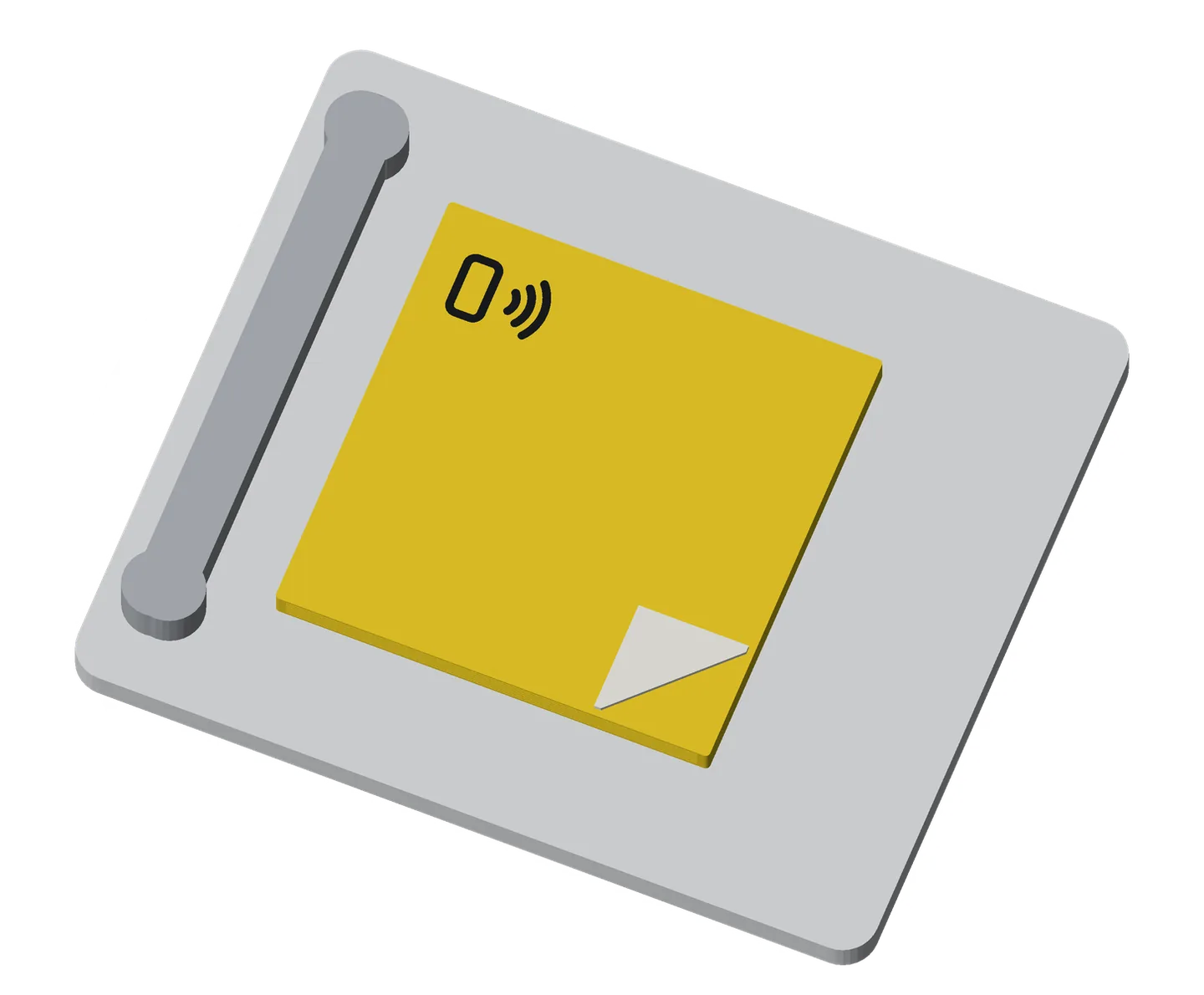
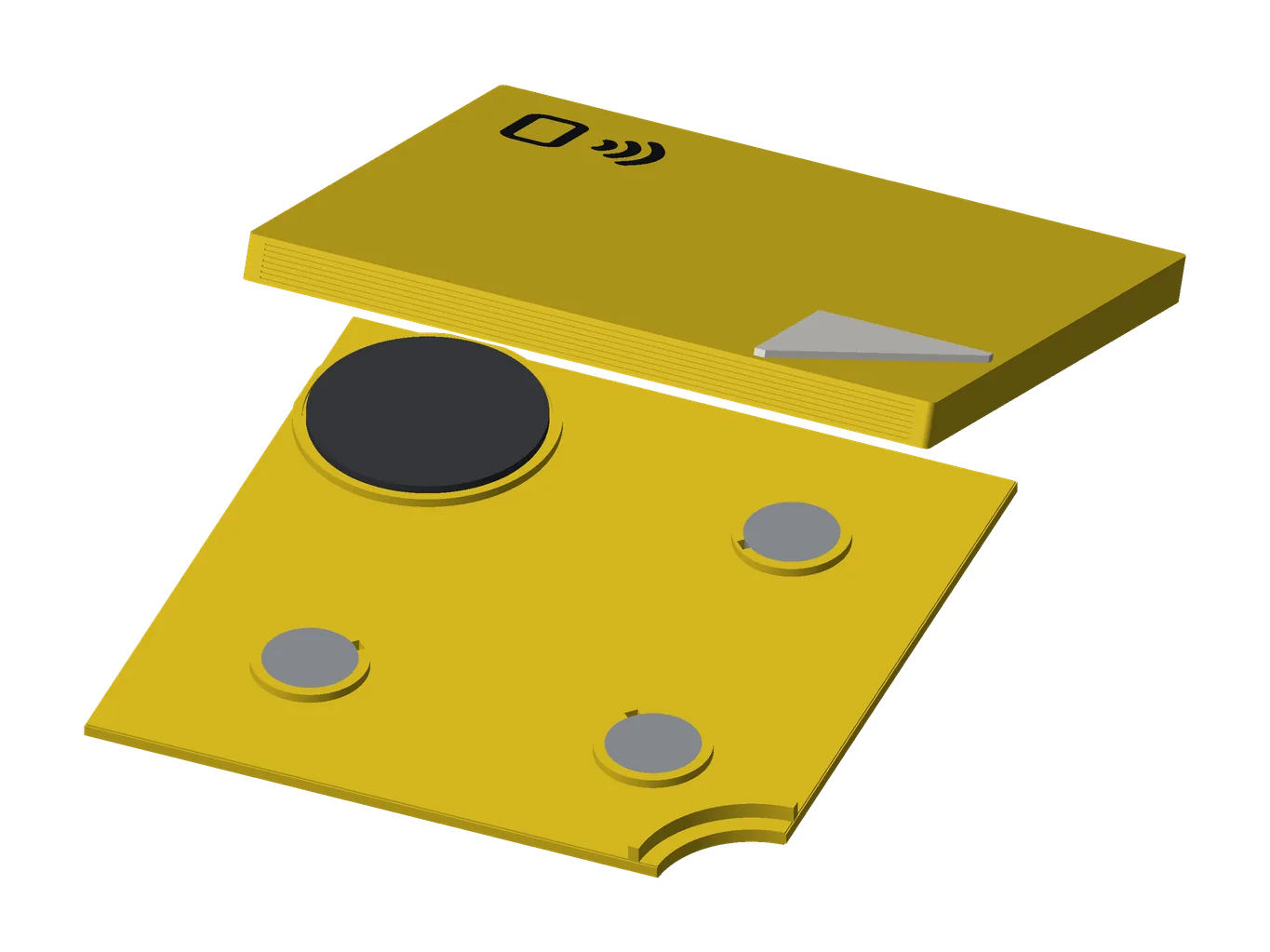
- how it works
- Tap the tap icon: the sticker is under it.
- Today: it opens whatever you write to it, like any sticker: a link, your contact card, your guest Wi-Fi.
- Coming in the next app update, notes: write a note in Tilde (“Back at 6, dinner’s in the fridge”), then Write a sticker. A tap opens the note on a page, on any phone, with no app. To change it, edit it in Tilde and tap the sticker again.
- Anyone who taps it can read it.
- On the fridge: magnets in the back. On a desk: the cradle, or the thin back.
- use cases
- Guest Wi-Fi on the fridge: Android guests tap; iPhones scan a Wi-Fi code.
- A note for the family: for the sitter or the kids (coming in the next app update).
- Save my contact: the family’s numbers, as a contact card.
- A link: the school calendar, the takeout menu.
- pairs well with
- Grocery list: the same back, for the list.
- Calendar: the same family on the fridge.
- Wi-Fi coaster: guest Wi-Fi with a code iPhones can scan.
for makerswhat you need, sizes, options
- NFC sticker: 1 round 25 mm sticker (an NTAG216 holds a full contact card; an NTAG215 is fine for a link); an anti-metal one (25 × 1.0 mm, ferrite side down) for the thick backs on a fridge.
- Magnets: 10 × 2 mm, 3 for the large note (1 for the small).
- Glue: for the folded corner.
- Printer: two or three colors.
- Difficulty: easy.
- options
- Size: large (76 mm) or small (51 mm).
- The tap icon: on or off, in a corner or the center.
- The back: thin (no magnets), thick solid, or thick and light.
- Magnets: outside, inside, or off. A pry cutaway to lift it, and a folded corner.
- A cradle for the desk.
- Colors: yellow and black, or your own.
- size and materials
76 × 76 mm (small 51 × 51); the face is 1.6 mm, a thick back 5 mm. PLA, about 21 g (thin back) to 36 g (thick solid).
Grocery list
Printable now
A printed list for the fridge, handwritten-style (“milk, bread, eggs”), with an NFC sticker inside.
get the files: the notes on GitHub: open it in OpenSCAD’s Customizer, choose the Type, and export a 3MF. The Model Maker on MakerWorld once its listing is public.
The list on the fridge is never the one in your pocket.
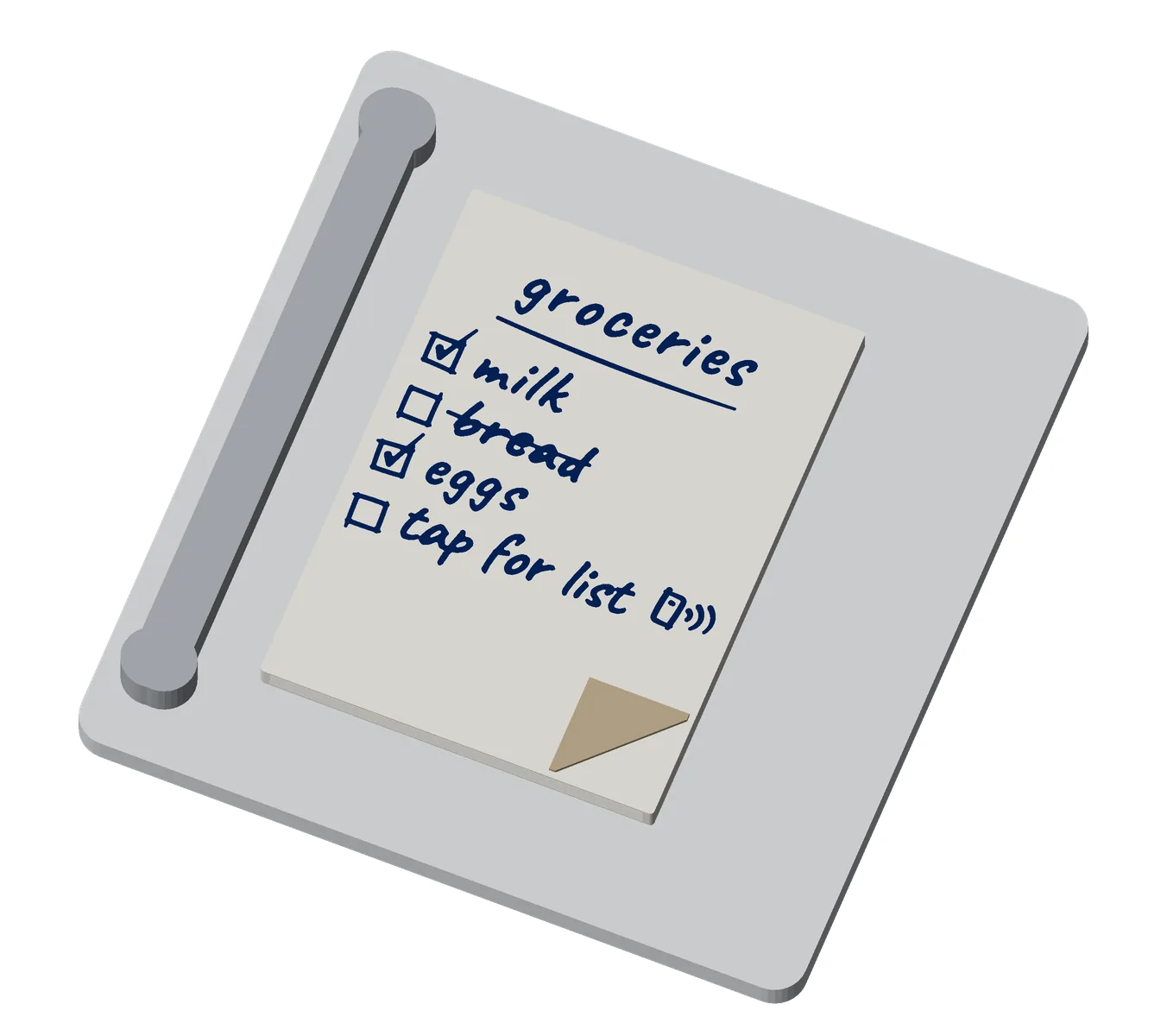
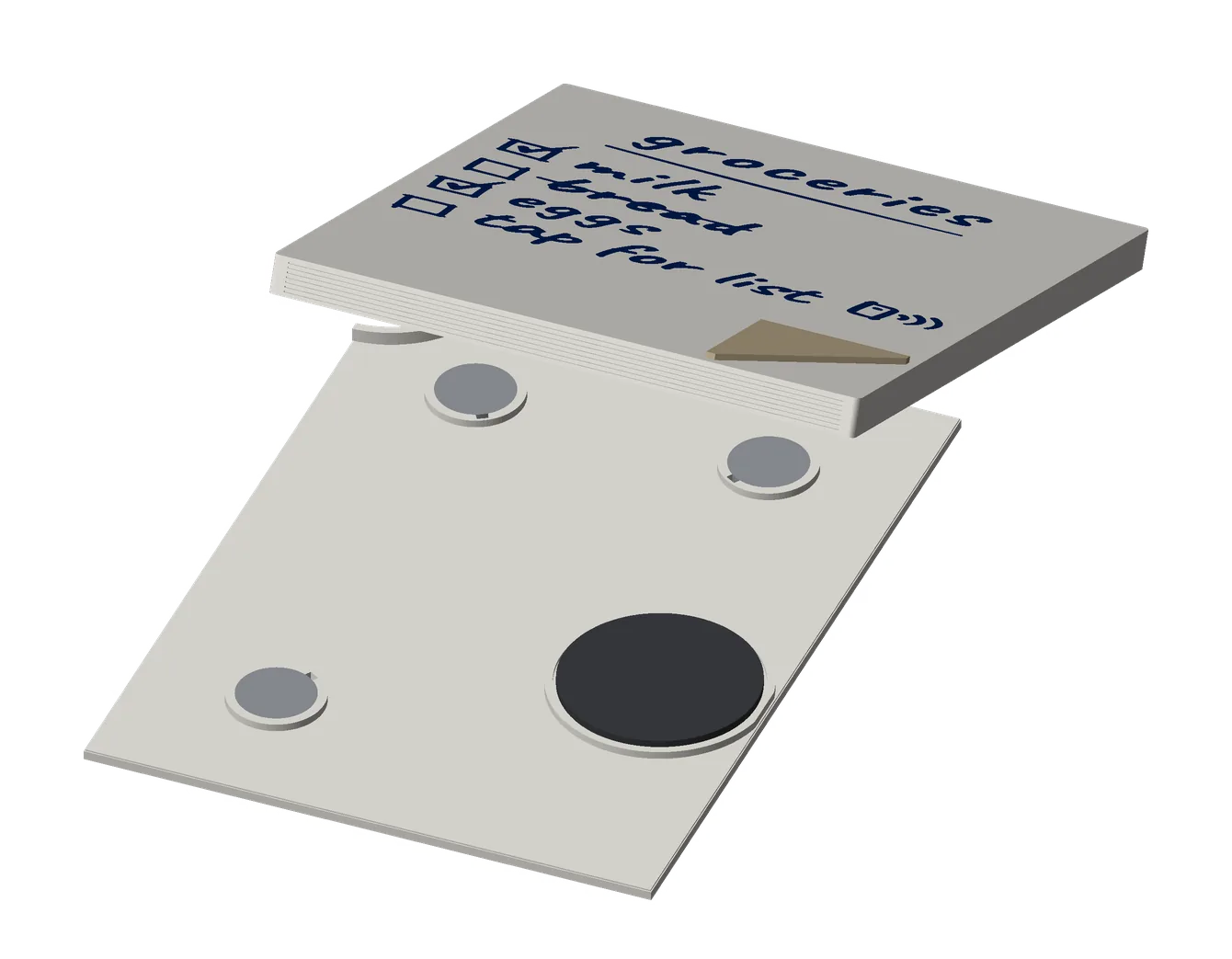
- how it works
- Today: a tap opens whatever you write to the sticker, such as a link. Tilde doesn’t make lists yet.
- Coming in the next app update, lists: make the list in Tilde, then Write a sticker. A tap opens the list on a page with tick boxes, on any phone, with no app. Your ticks stay on your phone; they don’t change the list on the fridge. To update it, edit it in Tilde and tap the sticker again.
- It doesn’t sync: the list on the page is what’s on the sticker. Only its owner updates it, in Tilde.
- Anyone who taps it can read the list.
- use cases
- The shopping list on the fridge: tap it on the way out, and the list is on your phone (coming in the next app update).
- The week’s meal plan, the same way (coming in the next app update).
- pairs well with
- Sticky note: the same back and magnets.
- Calendar: the family’s fridge.
for makerswhat you need, sizes, options
- NFC sticker: 1 round 25 mm sticker, under the tap doodle (an NTAG216 holds a full contact card; an NTAG215 is fine for a link); anti-metal for the thick backs on a fridge.
- Magnets: 10 × 2 mm, 3.
- Glue: for the folded corner.
- Printer: three colors.
- Difficulty: easy.
- options
- Size: tall (76 × 102 mm) or short (76 × 76).
- The print: a title and up to six items, each open, ticked or struck; the tap row’s words and layout.
- The back, magnets, cradle and colors: as the sticky note (white, navy and khaki by default).
- size and materials
76 × 102 mm (short 76 × 76); the face is 1.6 mm. PLA, about 28 g (tall).
Wi-Fi coaster
Printable now
A weighted coaster with your Wi-Fi’s QR code and network name on top, and an NFC sticker under the Wi-Fi icon.
get the files: the Wi-Fi coaster on GitHub: open it in OpenSCAD’s Customizer and export a 3MF. The Model Maker on MakerWorld once its listing is public.
“What’s the Wi-Fi?”, answered without reading out a password.
- how it works
- Scan: the printed Wi-Fi code joins the network, on iPhones and Android phones.
- Tap the Wi-Fi icon: an Android phone offers Connect. iPhones scan the code.
- A new password: rewrite the sticker with the app; the printed code needs a new top.
- use cases
- Guest Wi-Fi at home: on the coffee table.
- A café or a shared office: the code at every table (with the owner’s OK).
- A holiday rental.
- pairs well with
- Tilde Stand: the same Wi-Fi, standing up on a counter.
- Sticky note: guest Wi-Fi on the fridge.
- Premium coin: guest Wi-Fi on your keys.
for makerswhat you need, sizes, options
- NFC sticker: 1 round sticker, 25 mm: an NTAG216 holds a full contact card; an NTAG215 is fine for a link or your guest Wi-Fi. Search “NTAG216 25mm round NFC sticker”.
- Weight: up to 16 M8 fender washers, DIN 9021 (24 mm across; US 5/16” fender washers are larger and won’t fit).
- Underneath: a 96 mm cork or felt disc, or three 12 mm felt pads.
- Printer: multi-color; on an A1 mini, print the parts one at a time.
- Difficulty: medium.
- options
- Your network: its name, password, security, and whether it’s hidden.
- The face: five layouts, the code or the icon first, the name shown or not, the code’s square size, the code inlaid or on a separate label.
- The ring: threaded, bayonet, or none (the top drops in).
- Colors: black, white and orange, nine more schemes, or your own.
- Weight and base: washers on or off, how many per well, a flat underside or recesses for felt pads, the sticker’s size.
- size and materials
100 mm across, 15 mm tall with the ring. PLA, 4 walls.
Calendar
Printable now
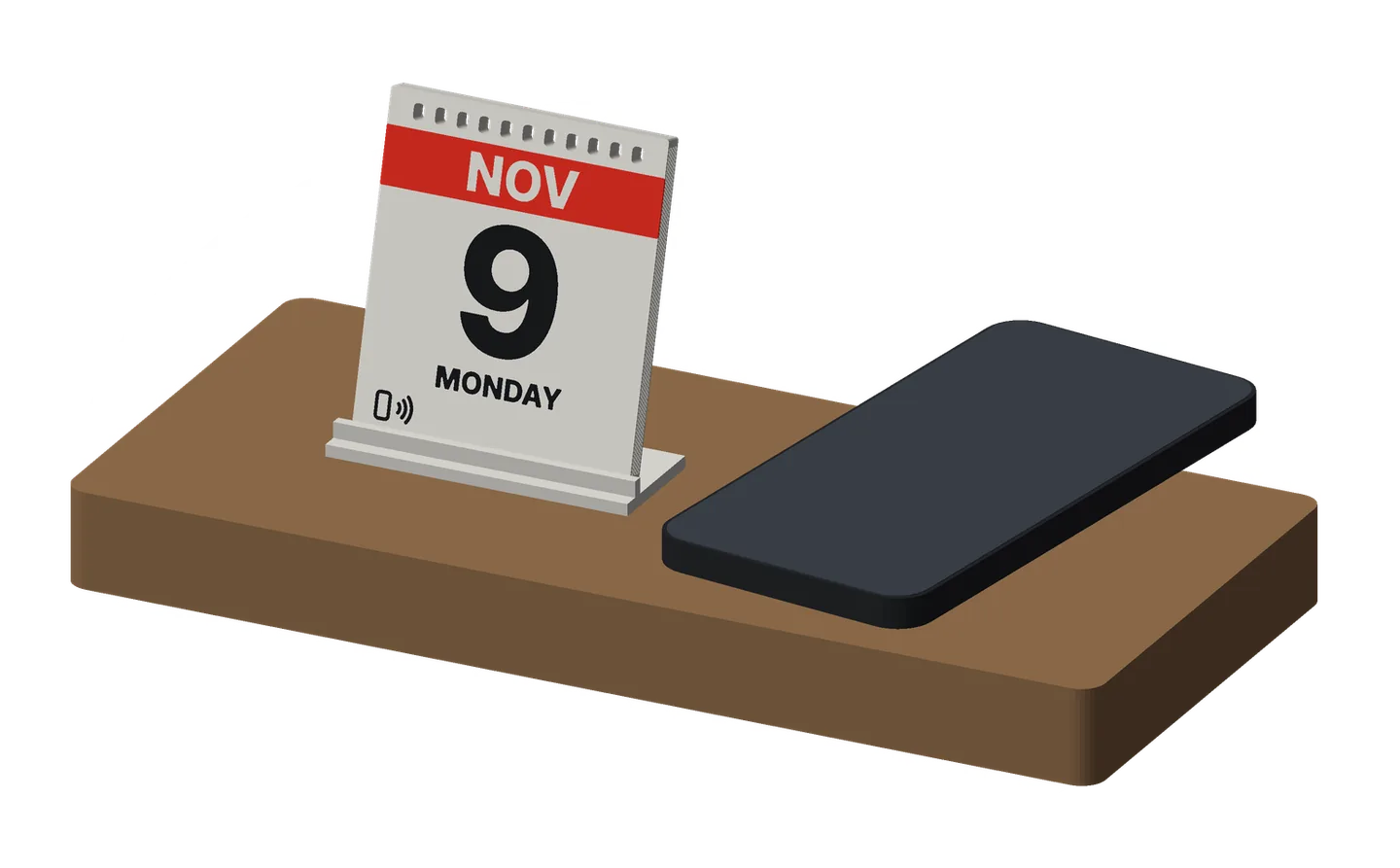
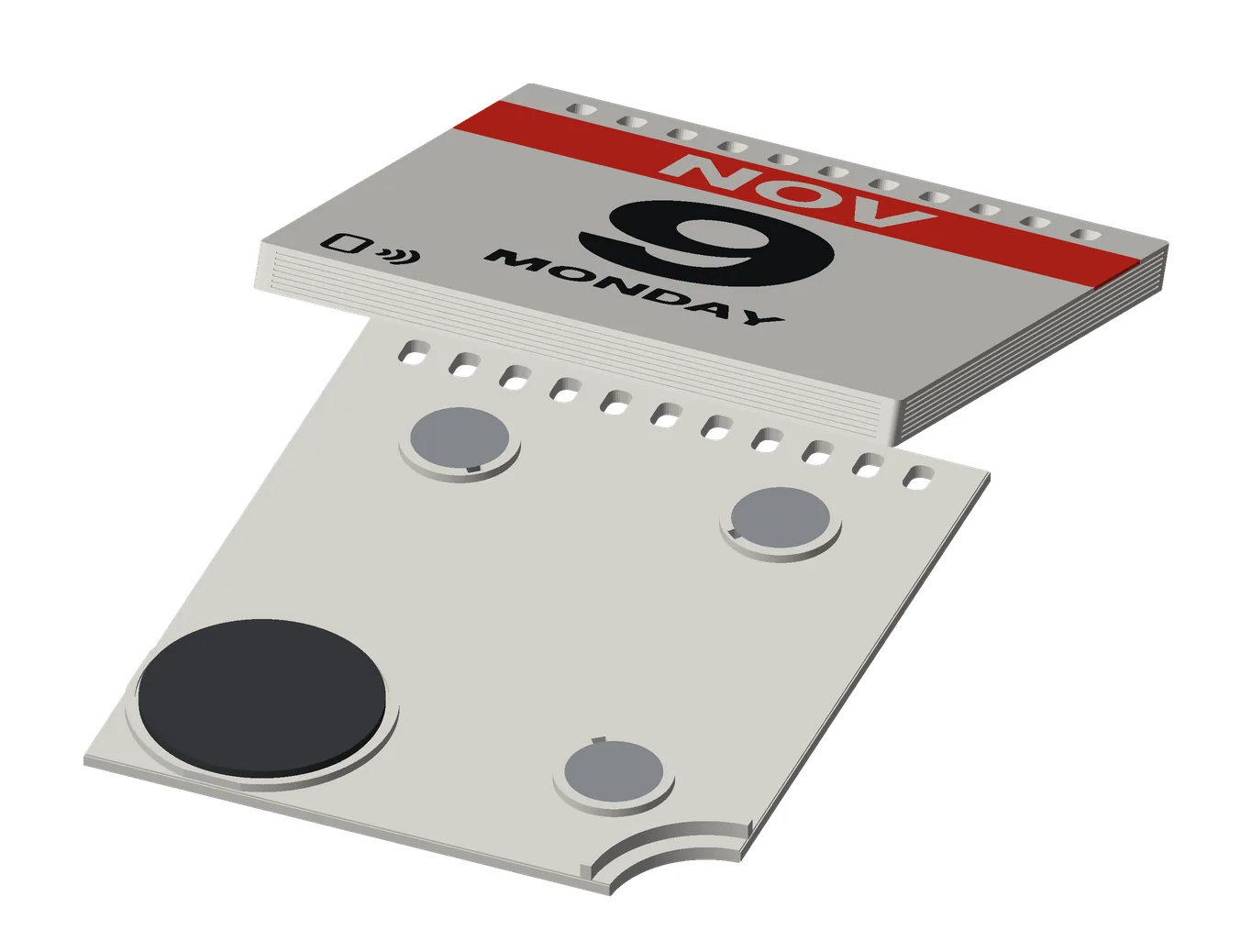
A tear-off-style desk calendar page (the month, the day, the weekday) that opens your booking page with a tap.
get the files: the notes on GitHub: open it in OpenSCAD’s Customizer, choose the Type, and export a 3MF. The Model Maker on MakerWorld once its listing is public.
“When are you free?”, answered with a tap instead of a thread of messages.
- how it works
- Tap the tap mark (bottom left): it opens your booking page (Calendly, a Google appointment page, any booking link). Write the link with Tilde’s Write a sticker, or NFC Tools on an iPhone.
- Today mode prints TODAY with “tap to book”, so it never goes out of date.
- On a desk in the cradle, or on the fridge with magnets.
- use cases
- Book a meeting: your booking page.
- An event’s date: a tap opens the event’s schedule.
- An evergreen desk page: “TODAY · tap to book”.
- pairs well with
- Sticky note: the same family.
- Premium coin: a “book a meeting” coin on your keys.
- Tilde Card: your booking link in two places.
for makerswhat you need, sizes, options
- NFC sticker: 1 round 25 mm sticker (an NTAG216 holds a full contact card; an NTAG215 is fine for a link); anti-metal for the thick backs on a fridge.
- Magnets: 10 × 2 mm, 3 (optional).
- Printer: three colors.
- Print time: about 55 min.
- Difficulty: easy.
- options
- The page: the month, the day and the weekday, or Today mode.
- The binding: holes, a printed band and line, or none.
- The back, magnets, cradle and colors: as the sticky note (white, red and black by default).
- size and materials
70 × 80 mm; the face is 1.6 mm. PLA, about 23 g.
Tilde Stand
Printable now
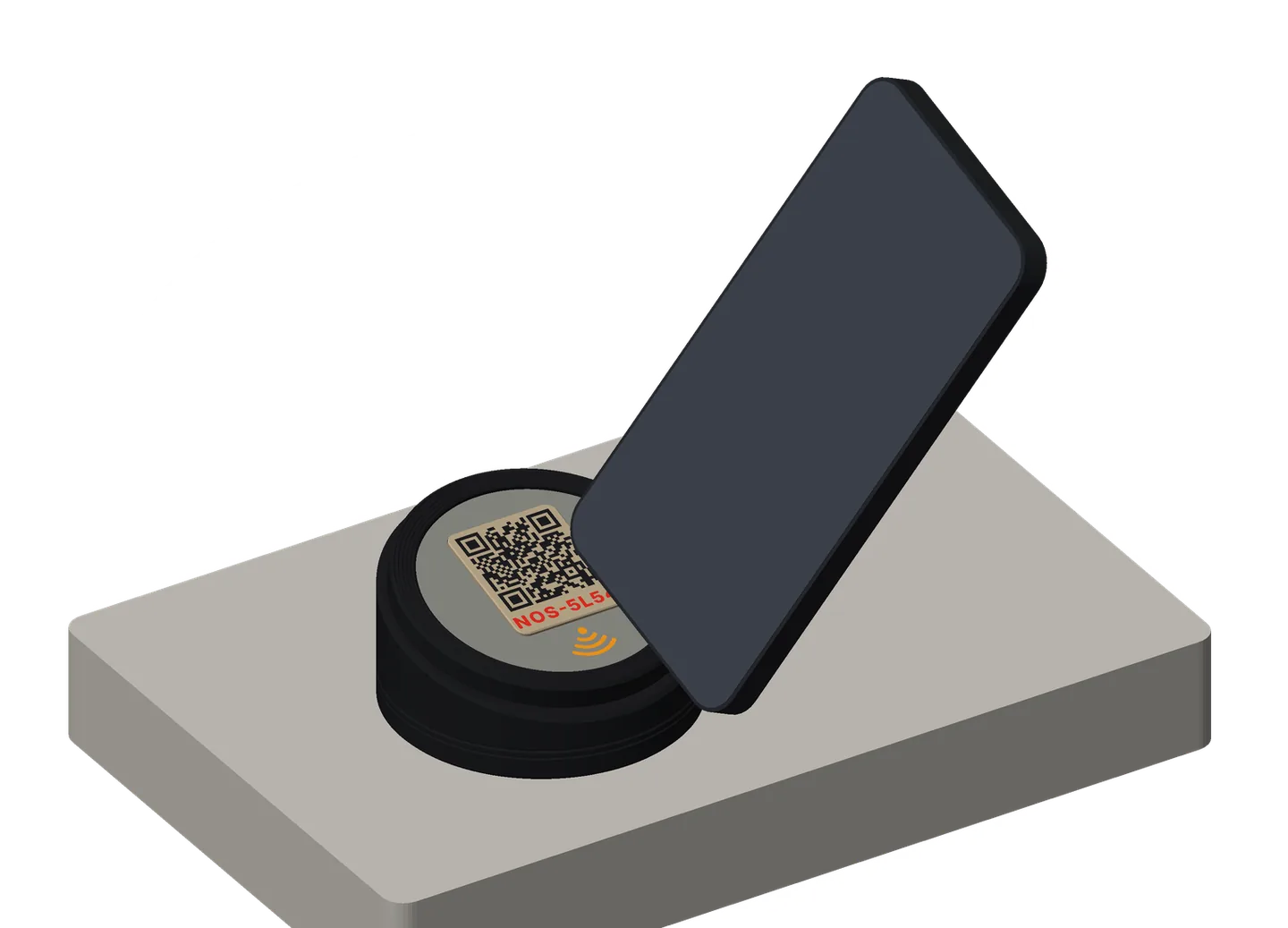
A weighted stand for a shelf or a counter, its face tilted toward you. With its Wi-Fi top, it shows your Wi-Fi’s code to scan and an NFC sticker to tap.
get the files: the Tilde Stand on GitHub (Piece: Tilde Stand): open it in OpenSCAD’s Customizer and export a 3MF. The Model Maker on MakerWorld once its listing is public.
Guest Wi-Fi where people stand, not on a card behind the till.
- how it works
As the Wi-Fi coaster. The sticker sits under the icon at the front of the face. A new password needs a new code label.
- use cases
- Guest Wi-Fi on a console table at home.
- A counter: a café, a shop, a reception desk.
- Public areas: a waiting room, a co-working space.
- pairs well with
- Wi-Fi coaster: the same Wi-Fi, on a table.
- Stand Mini: the desk-sized stand, for a coin.
for makerswhat you need, sizes, options
- NFC sticker: 1 round sticker, 25 mm: an NTAG216 holds a full contact card; an NTAG215 is fine for a link or your guest Wi-Fi. Search “NTAG216 25mm round NFC sticker”.
- Weight: up to 16 M8 fender washers, DIN 9021, and a 2 mm cork disc for the cup’s floor.
- Printer: multi-color; the parts fit an A1 mini’s plate.
- Difficulty: medium.
- options
- The look: turned lines or flutes round the body; the face tilted 15° or 20°.
- Your network, the face, colors and sticker: as the coaster.
- Weight: on or off.
- size and materials
78 mm across; 16 mm at the front, 36.6 at the back. The top is keyed square by two pegs, and the weight sits in a cup that screws off underneath. PLA.
Stand Mini
Coming soon
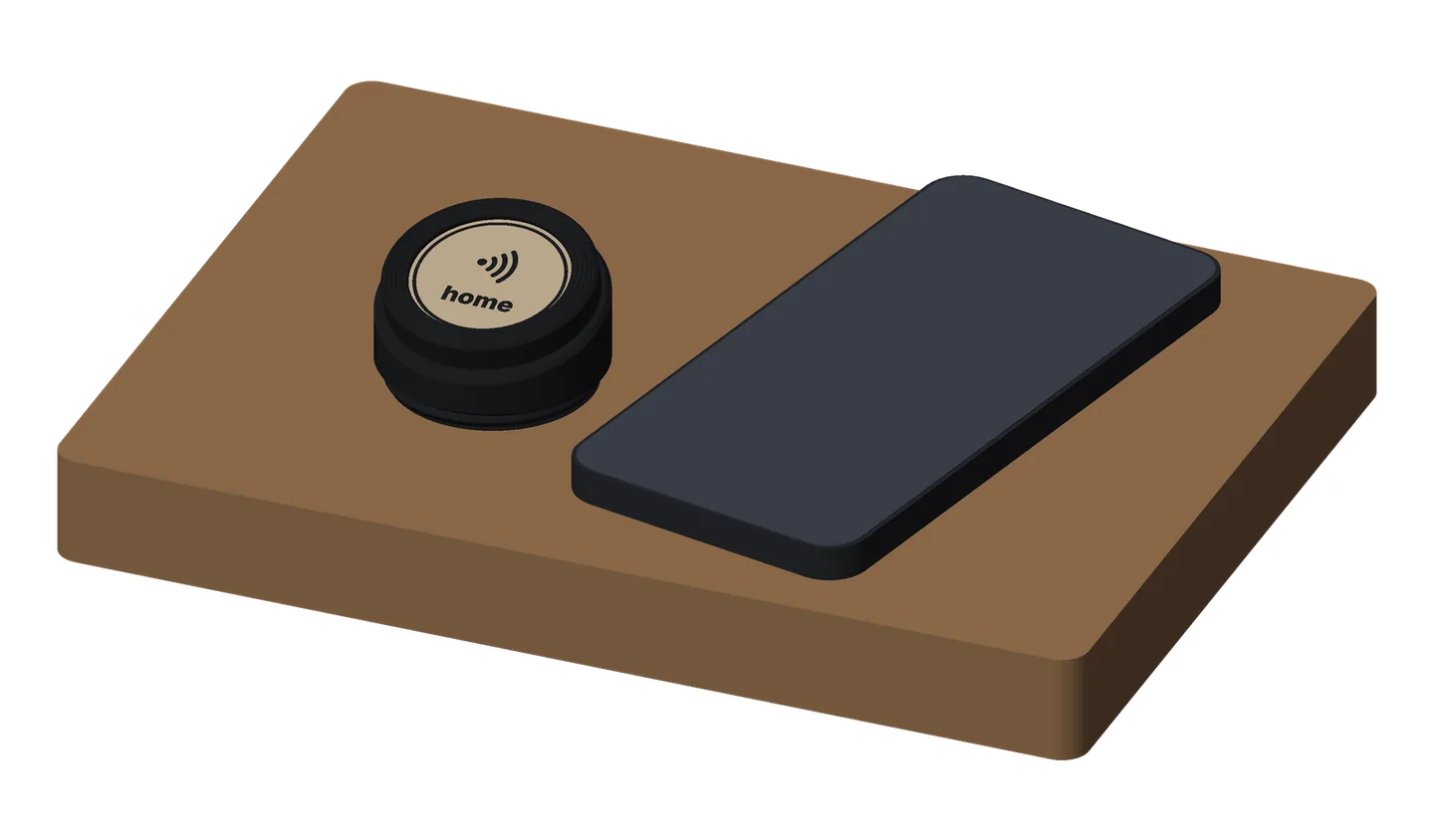
A small weighted stand that holds one earless Premium coin face up on your desk, tilted toward you.
get the files: coming soon.
Your coins on the desk, ready to tap, and easy to switch.
- how it works
- Tap the coin in the stand: it opens whatever that coin’s sticker holds.
- Switching coins: unscrew the ring, lift the coin out, drop another in.
- use cases
- Your packages: a package coin opens your package list in Tilde; other phones see what the tag is (coming in the next app update).
- Guest Wi-Fi on a desk or a reception counter: for Android guests.
- Book a meeting: on your office desk.
- Save my contact: at a front desk.
- pairs well with
- Premium coin, earless: its coin.
- Tilde Stand: the counter-sized stand.
- Calendar: a desk with both.
for makerswhat you need, sizes, options
- An earless Premium coin, with its sticker.
- Weight (optional): 6 M8 fender washers, DIN 9021, and a 2 mm cork disc.
- Difficulty: easy.
- options
None yet: its file is coming with its first print.
- size and materials
49.4 mm across; 16 mm at the front, 29.2 at the back; the face at 15°. Holds one earless Premium coin (36 × 36 mm). PLA, black.